
Lutris, the free open-source game manager for Linux, released new 0.5.20 in last week and then 0.5.22 today.
This version added few new sources to manage more games, and more and updated runners with ability to run more games.
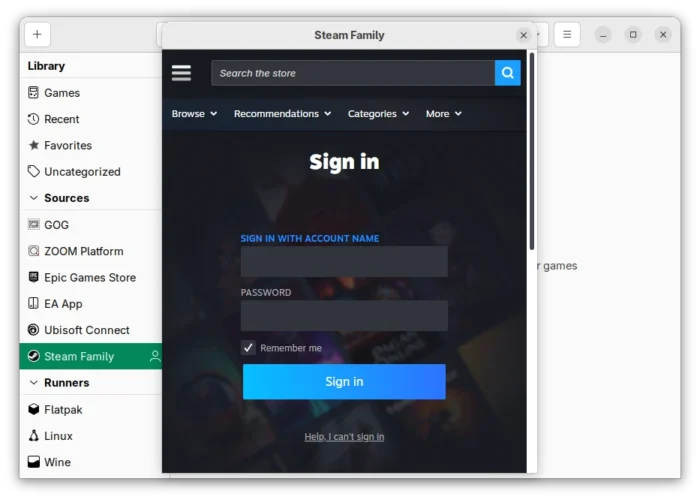
First, the 0.5.20 version released in last week added “Steam Family” source, to display and launch steam games shared through steam family feature.
It also added support for managing games from ZOOM platform, a GOG-like competitor which provides DRM-free and classic PC games for Windows, Linux, and macOS.
In addition, it added Azahar runner (Nintendo 3DS Emulator), updated TIC-80, EasyRPG, mGBA, Rosalie’s Mupen GUI, Ruffle, 86Box runners to most recent versions.
And, it added Wine runner option to select Wine’s “Wayland driver”, as well as Ryujinx runner option to specify ‘application ID’ for your multi-game XCIs.
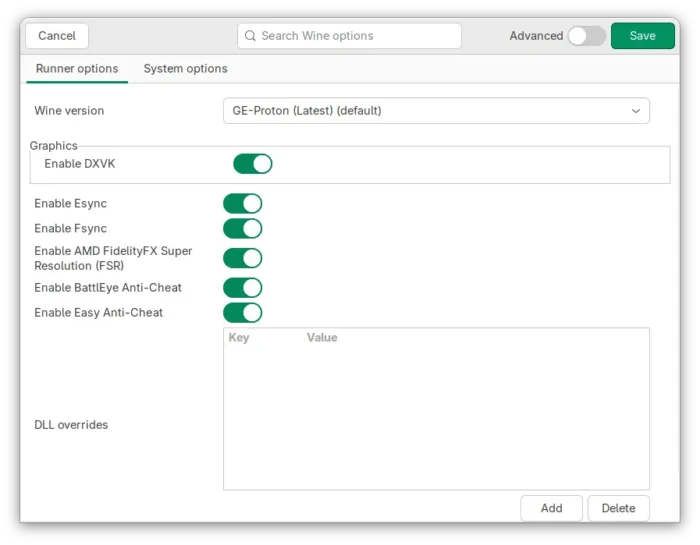
Proton-GE, the umu version of Valve’s Proton, is now the default for the Wine runner. And, it comes with Esync, Fsync, DXVK setting options, as well as DXVK’s integrated D8VK enabled.
With the new 0.5.22 (and 0.5.21) version released today, it also supports ShadPS4 runner for PlayStation 4 and Xenia runner for Xbox 360 emulation. And, Dolphin-emu runner has been updated to use AppImage, which fixed libavformat dependency issue for old Linux Distributions.
It also added Sniper runtime support for running native Linux games in isolated environment with updated libraries for enhanced compatibility and stability, Ubuntu’s default Ptyxis terminal (since 25.10) support for CLI mode, and ICDs support for Intel Xe GPUs.
Other changes include:
- Double-click
.lutrisinstaller files to run. - Support for importing Commodore 64 ROMs.
- Fix GPU UUID detection for multi-GPU systems.
- Add Portuguese (Portugal) language support.
- New ‘Create Steam Big Picture shortcut’ context menu option.
- Option to set game covert-art, banner and icons via URL.
Get Lutris
For more about the new releases, as well as the source tarball, go to the Github releases page:
The link above also provides .deb installer for Debian and Ubuntu based distributions.
For Ubuntu, there’s also an official PPA so far support Ubuntu 20.04, Ubuntu 22.04, Ubuntu 24.04, and Ubuntu 25.10.
To add the PPA and install/update the latest Lutris, open terminal and run commands:
sudo add-apt-repository ppa:lutris-team/lutris
sudo apt update
sudo apt install lutris
For other Linux distributions, Lutris is available to install as Flatpak package which runs in sandbox environment.
Uninstall:
To remove Lutris .deb package as well as the PPA, run commands below one by one:
sudo apt remove lutris
sudo add-apt-repository --remove ppa:lutris-team/lutris
sudo apt update
source https://ubuntuhandbook.org/index.php/2026/02/lutris-0-5-22-added-steam-family-sources-new-game-runners/


Tidak ada komentar:
Posting Komentar