
PeaZip, the free open-source file manager and archive utility, released new major 11.0.0 version few days ago.
The new version sped up the archive browsing, improved bookmarks and internal drag and drop feature, and added new test function.
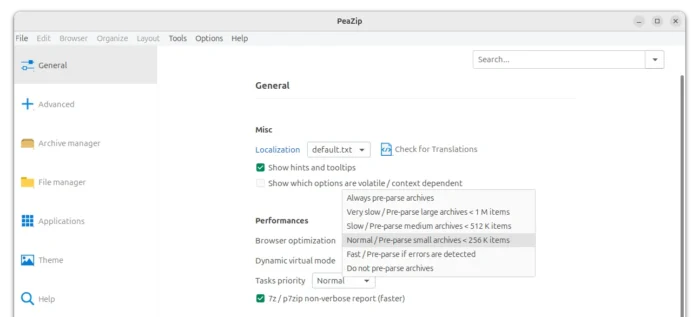
First, it added new browser optimization mode to improve speed for opening and navigating large archives. And, it added text description in the drop-down selection, to differentiate between small archives (less than 256 K items), medium archives (< 512 K items), and large archives (<1 M items).
It as well greatly improved the pre-parsing process. According to the changelog, it can save up to 90% less time for very large archives over 100K items, and save up to 30% time for archive treeview rendering step.
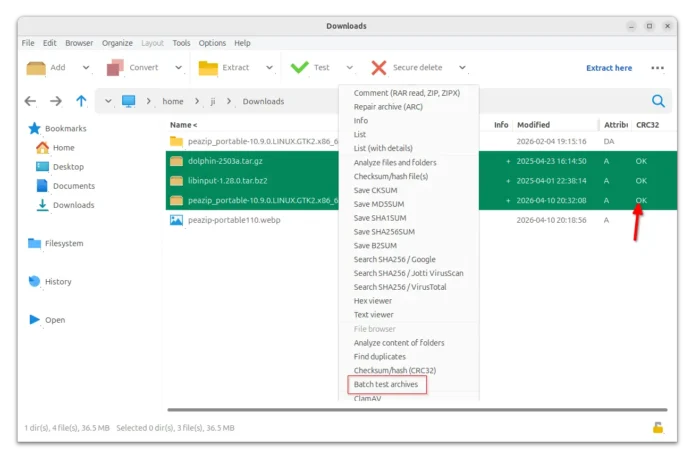
Besides browser optimization, the new version introduced new batch test archives option, which is available in the tool-bar test drop-down menu.
With it, you can select multiple archives and test them all with one click. Except for asking for password (if need), all will be done without interruption. And, it will report either success or failure in the file manager via CRC column.
The new 11.0.0 version also improved the bookmarks by making possible to add Search and Flat view bookmarks of filesystem items.
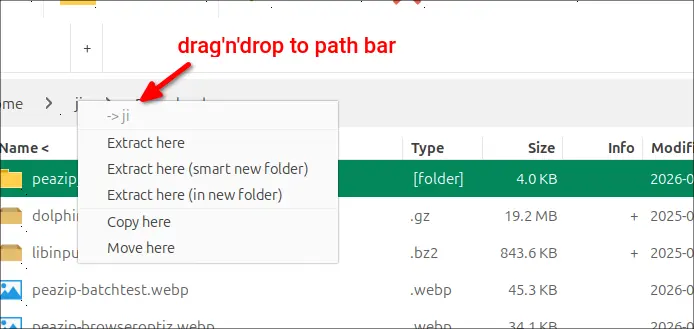
It as well improved the internal drag’n’drop feature. You can drag’n’drop items into the Breadcrumb bar (Path bar) or Tab bar, and it will pop-up a small menu to choose copy, move, or extract there. And, drag’n’drop move copy actions will now stay at current directory instead of navigating to target directory afterwards.
Other changes in PeaZip 11.0.0 include:
- Enable virtual mode by default for archives with over 16K items for GTK2 UI, which improves browsing performance for large archives.
- Improve zoom and fractional scaling.
- Supports alternative rendering styles for icons.
- password entropy rating in Password Manager and in Password Prompt screens.
- Various bug-fixes and other changes.
Get PeaZip 11.0.0
For more about the new 11.0.0 version, see the official changelog page.
To download PeaZip, just go to its website via the link below:
For Linux, there are a few different type of packages. See this beginners’ guide for how to install and set it up in Ubuntu.
source https://ubuntuhandbook.org/index.php/2026/04/peazip-11-0-0-released-larger-archives/


Tidak ada komentar:
Posting Komentar